When you formed your LLC, you didn't think twice about whose name went on the paperwork. It was yours. You filed the Articles of Organization, got the EIN, opened the bank account and kept the operating agreement somewhere safe. You may have hired an accountant or attorney to help, but you would never have let them be the owner.
Your technology works the exact same way, but most small businesses don't treat it that way. It's true for business owners everywhere, including here in Putnam County, from Carmel and Kent to Mahopac and Brewster.
Your digital “keys” are the logins, accounts, subscriptions, and settings that control your website, email, files, devices, and customer information. They determine who can get in, who can make changes, and who can lock you out. And just like your LLC paperwork, if the wrong person has those keys, or if nobody knows where they are, your business is exposed.
What happens when you don't control your business's IT?
When an owner doesn't control their business's IT, they usually find out at the worst possible moment. A domain expires because the renewal notice went to an inbox the owner didn't know existed. The person who set up the company email is no longer around, and the owner doesn't have the admin password. Whoever built the website has moved on, and suddenly the owner is trying to get into an account that was never in their name.
None of this happens because owners are careless. It happens because most owners were never told what digital ownership means or what's at stake without it. The setup was done years ago by whoever was available at the time, and the owner is left hoping nothing breaks.
This is the digital version of not knowing where your LLC paperwork is, except the consequences can be faster, more expensive, and harder to unwind.
What is the difference between IT ownership and IT access?
Every LLC owner already knows this distinction, even if they've never applied it to technology. An LLC can be member-managed or manager-managed. A manager can be brought in to run the day-to-day, but the members still own the company. A registered agent can receive legal mail on the company's behalf, but the agent doesn't own anything.
Technology works the same way. An IT provider, web designer, or tech-savvy employee should have the access they need to do their job. Ownership, meaning the top-level administrator account, should stay with the business and its owner.
Most digital accounts allow more than one admin, so there's no reason the owner can't be one of them. At a minimum, the owner's email should be on the account, and the owner should have the login and password.
A good rule of thumb: if someone walking away would leave the owner locked out, that person doesn't just have access. They hold the keys.
Which IT accounts should a small business owner control?
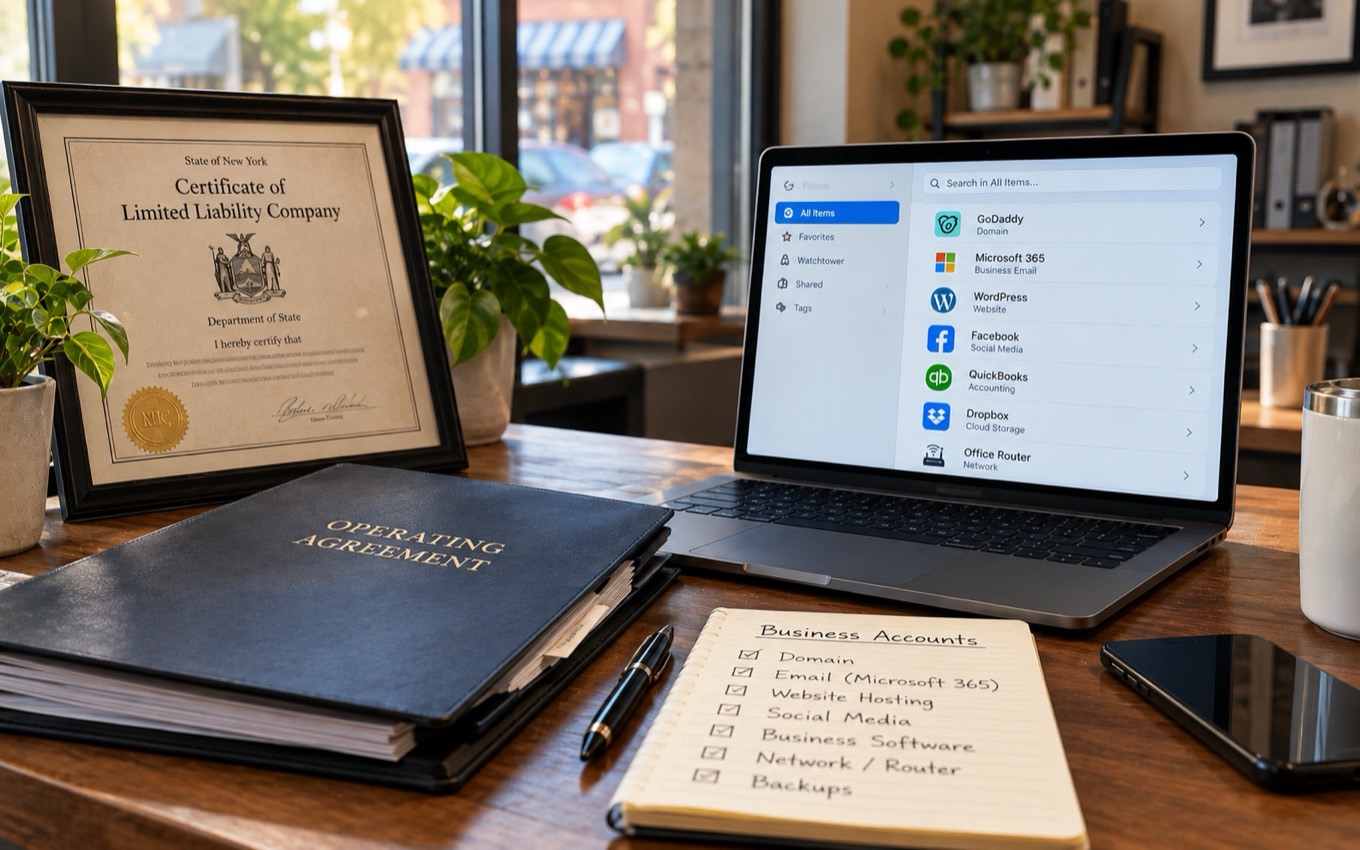
When you hear “keys,” it's easy to picture passwords. But your digital keys include far more:
Who controls your website address. The account where the domain is registered should be in the business's name, under a business email you control. Lose the domain and you can lose your website and your email at the same time.
Who can reset passwords or add accounts. You should hold the top administrator account for Microsoft 365 or Google Workspace.
The login for wherever your site lives, plus a recent copy of the site.
Who can see or delete your files.
You should be a full admin on every business page, not just an editor.
Wi-Fi and network access, including the admin passwords for your internet modem, router and any firewall.
Who can wipe or unlock your laptops and phones.
Billing, scheduling, CRM, point of sale. The owner account should be yours, with billing on a business card.
Shipping, banking, payment processors.
Know where they are, that they're working, and how to get to them without calling someone.
If someone else has full control of these, they control your business.
If nobody controls them, your business is vulnerable.
If you think you control them but don't actually know where the keys are, you're operating on luck.
If you don't know your passwords or have them in a spreadsheet, you don't own your business.
How do you take back control of your business's IT accounts?
You don't need a security team or a big budget. You just need ownership.
Most owners keep their formation documents, EIN letter and operating agreement in one place. Your technology deserves the same treatment. Here's where to start:
- 1.List every critical account (email, domain, website, banking, software).
- 2.Identify who has admin access, and remove anyone who shouldn't.
- 3.Move all ownership to a business email you control, not a personal one.
- 4.Have two admins, never one. You plus one trusted backup, so no single person can lock the business out.
- 5.Turn on multi-factor authentication for every admin login.
- 6.Document everything so you're never guessing again. For each account, note whose name it's in, who else has access, and when it renews. Store the passwords in a business password manager, not a spreadsheet or a sticky note.
- 7.Review access anytime someone leaves the business, and once a year. Remove a departing person's access the same day, just like collecting the office keys, and do a full review annually, the same way you keep up with your LLC's required filings.
This isn't modernization. This is maintenance, the digital version of keeping your LLC paperwork in a safe place.
Download the Business IT Keys Checklist
Use the free checklist to record who holds each of your keys and check off each step as you go.
Rather have us walk through it with you? Call PointTech Pros at (845) 604-4742.
Your business runs on keys. Own them.
Technology should make small businesses more capable, not more dependent. It's empowering the ones who take ownership of it. And ownership starts with knowing who holds the keys.
None of this means doing your own IT. You can and should rely on people who know technology well. It just means that, like your LLC, the business belongs to you, and the people who help you run it work with your permission, not the other way around.
If you wouldn't hand your LLC paperwork to a random person, don't hand your digital keys to one either.
If you aren't sure who holds the keys to your business today, that's the place to start. For business owners in Carmel, Mahopac, Brewster, Somers and across Westchester, Putnam and the Hudson Valley, PointTech Pros can help you take inventory of your accounts and get them back in your business's name.
What's one account or login you're not fully sure you control?
Frequently asked questions
Who should own my business's domain name?
+
The business should. The domain should be registered in the business's name, under a business email address the owner controls. If a web designer or IT provider registered it under their own account, ask them to transfer it to an account in your name.
Should my IT provider have the admin password to my Microsoft 365 or Google Workspace?
+
Your IT provider can have admin access to do their work, but the top administrator account should belong to the business owner. The safest setup is two admins: you and one trusted backup.
What should I do when an employee or vendor with admin access leaves?
+
Remove their access the same day, change any shared passwords they knew, and confirm that every account they managed is still in the business's name.
How do I find out who controls my business's IT accounts?
+
Make a list of every system your business uses, including the domain, email, website, social media, network and software. For each one, write down whose name the owner account is in, who else has access, and when it renews.
About the author
Victoria Bonilla is co-founder of PointTech Pros, which helps small businesses in Carmel, Mahopac, Brewster, Somers and across Westchester, Putnam and the Hudson Valley with cybersecurity, AI automation and modern IT. She and her husband, Milton Bonilla, built PointTech Pros to give local business owners the kind of technology support usually reserved for large companies.